
Approvals
Forge never changes your application without asking. Here's how approval cards, risk levels, and approval modes keep you in control.
Forge doesn't change anything behind your back. When it's about to create, modify, or delete something, it pauses and shows you an approval card — what it wants to do, and how risky the change is. Nothing happens until you decide.
Reading never requires approval: Forge freely explores your application — listing workflows, inspecting the database schema, checking logs — to understand the context before proposing changes. Running a draft workflow with test data or chatting with a draft agent doesn't need approval either: it's how Forge checks its own work.
The approval card
When Forge requests a change, an Awaiting your input panel appears above the input field:
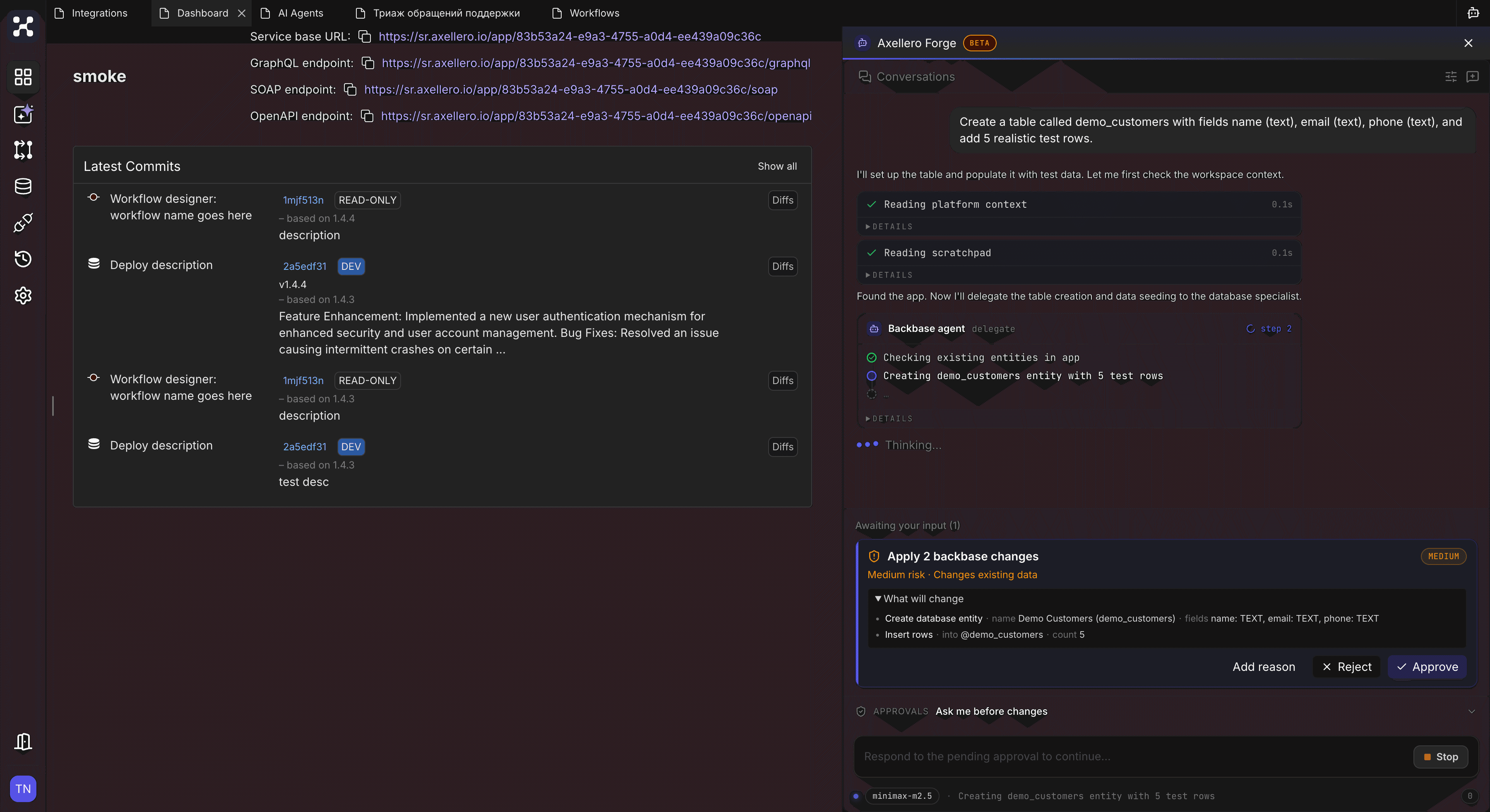
- A headline — Apply 2 backbase changes — with a risk badge (LOW, MEDIUM, or HIGH) and a one-line hint: Creates new data, Changes existing data, or Cannot be undone.
- A What will change section listing every single step, one row each — Create database entity · Demo Customers · fields name, email, phone, Insert rows · count 5. It's open by default, so the details are right there.
- Three actions: Approve, Reject, and Add reason — reject with a note explaining what you'd like instead, and Forge adjusts its approach.
While a card is waiting, the input field is locked — Forge can't take a new instruction until you answer. If you want something different, that's what Add reason is for.
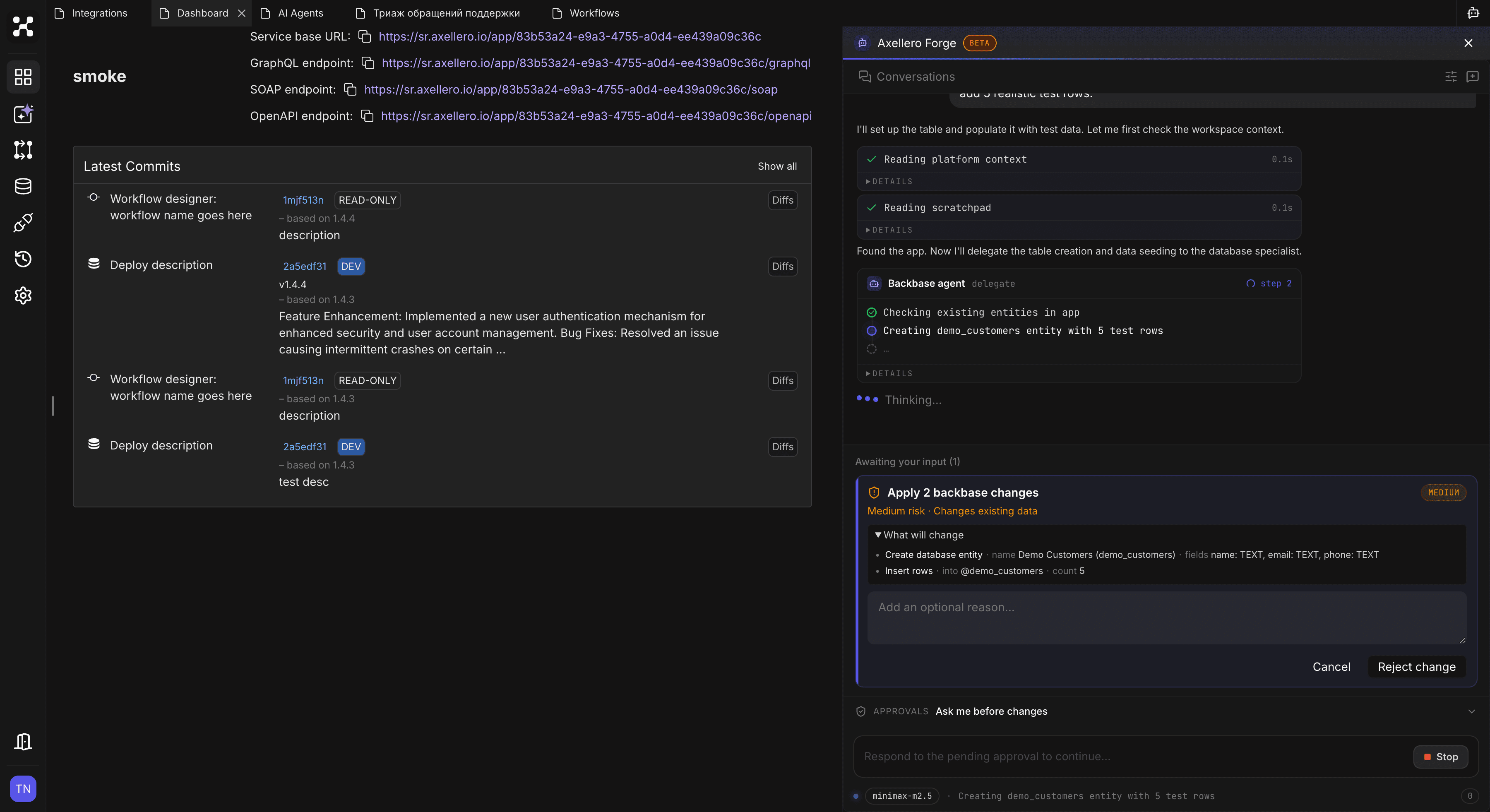
Rejecting doesn't end the conversation. Forge treats it as feedback: it won't perform the action, won't retry it, and will suggest an alternative or ask what to change.
Once you've decided, the card shrinks to a one-line Approved / Rejected strip. Clear settled tidies them away.
An approval request waits for 15 minutes. If you step away and it times out, Forge treats it as a "no" — just ask it to try again. Working in another tab meanwhile? Turn on notifications and the browser will tell you when a card is waiting.
One card, many changes
Forge groups related changes into a single card. "Build the order workflow" is one card that creates the flow, adds its nodes, links them, and sets the response — you'll see each of those as a row under What will change. The card's risk is the highest risk among its rows.
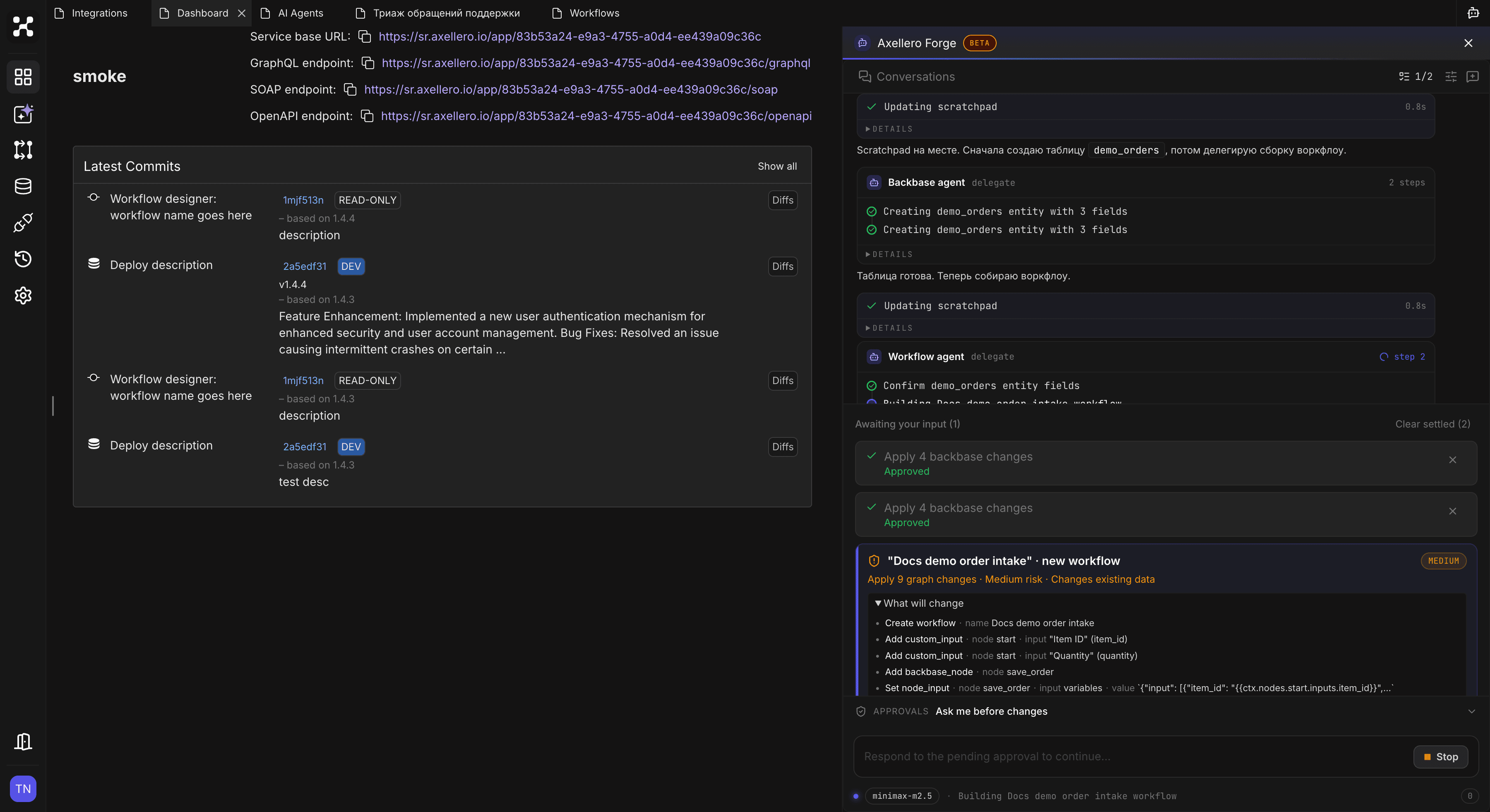
The changes are applied in order, and if one fails, Forge stops there and tells you what went through and what didn't.
Risk levels
| Risk level | What it covers | Examples |
|---|---|---|
| Low — safe, easily reversible | Creating things and editing drafts | Creating a workflow, adding a node, linking two steps, inserting test rows, creating a skill |
| Medium — changes existing data | Edits to things that already exist | Creating a table or field, changing a node's input, updating rows, creating a credential |
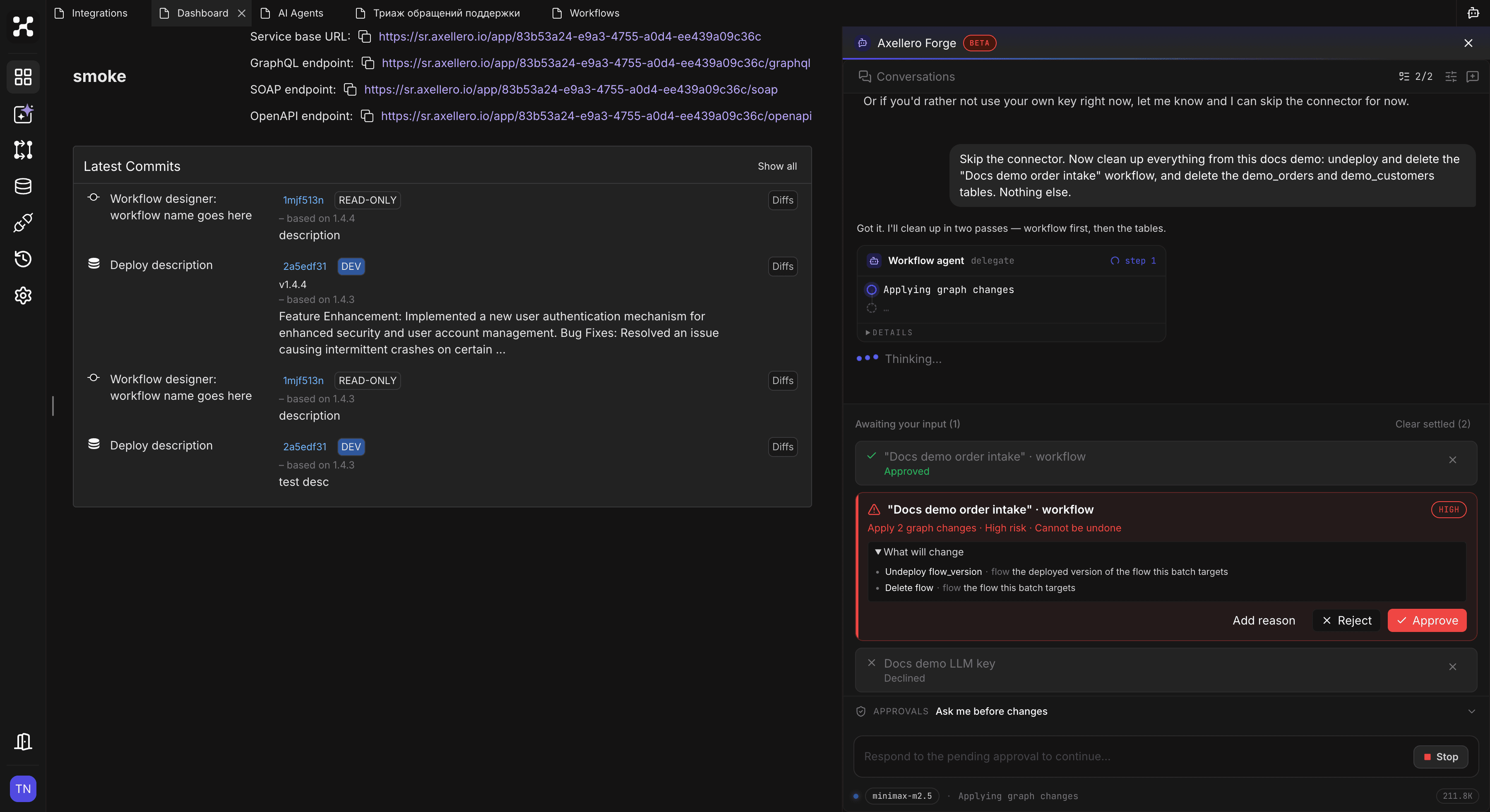
| High — cannot be undone | Deleting, deploying, and changes that can break what's live | Deleting a table, field, or rows; deleting a workflow, connector, or credential; deploying a version |
Worth pausing on high-risk cards: they are exactly the changes with no undo. The Approve button turns red on them — a small reminder to read the rows first.
Approval modes
How often Forge asks is up to you. The APPROVALS bar sits right above the input field and applies to the current conversation. You can also pick a mode before starting a new chat.
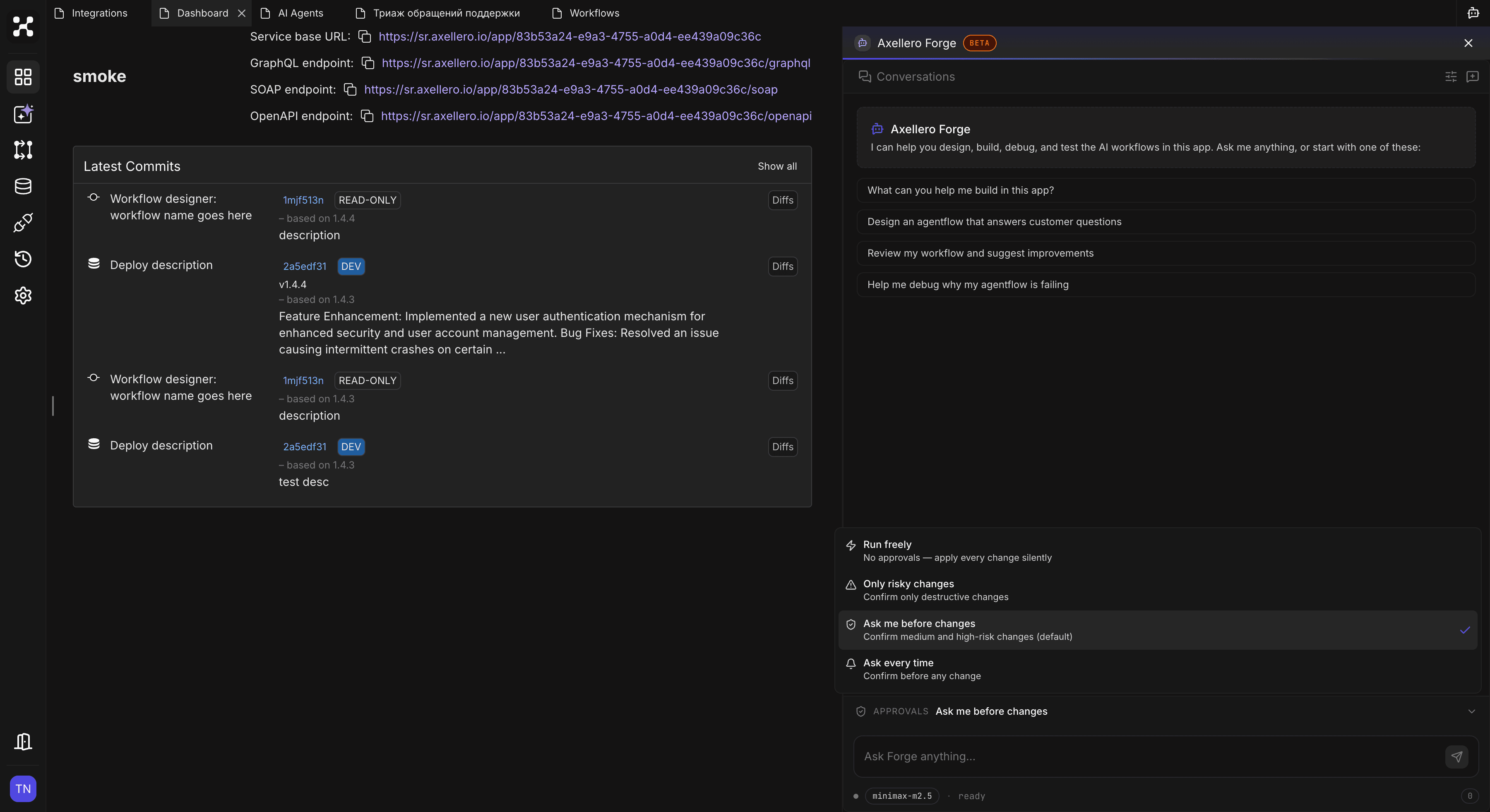
| Mode | Behavior |
|---|---|
| Run freely | No approvals — every change runs silently |
| Only risky changes | Ask only for high-risk changes: deletions and deployments |
| Ask me before changes (default) | Ask for medium and high risk; low-risk edits run without asking |
| Ask every time | Ask for every change, including low-risk draft edits |
The default strikes a practical balance: Forge iterates on drafts freely, but anything that touches existing data — credentials, rows, deployments — still comes to you first. Changing the mode mid-task takes effect on the very next change.
Run freely lets Forge perform any change, including irreversible deletions and deployments, without asking. It suits experimenting in a scratch application; think twice before using it in a workspace with real data.
Working in an app that already has data, workflows, or agents?
Stay on Ask me before changes (the default) — or stricter. Under the hood Forge is a set of language models. When editing something that already exists, a model may not see the whole context, may read your intent wrong, or may simply hallucinate — and quietly break work that took you weeks. Reading the card before approving is your safety net.
And one habit that costs nothing: save a version of your workflows and agents in Studio before you hand them to Forge. If something goes sideways, you have a known-good point to return to.
Secrets get their own card
When Forge needs an API key or token — say, to connect an LLM provider — it doesn't ask you to paste it into the chat. Instead a credential card appears with a masked input. The secret goes straight from your browser to the platform; Forge only learns that the credential now exists. See Setting Up Integrations.
Approvals and drafts are separate safety nets
Approvals control what Forge may change; drafts control what your users see. An approved edit lands in a draft version. Going live is a separate step — either you deploy in Studio, or you ask Forge to deploy, which is always a high-risk card of its own.